How Technology is Changing the Game of Risk Management Planning

Updated on: Apr 13, 2026 9 Minute Read
Risk management planning is no longer a back-office exercise that happens once a year before an audit. The way organizations identify, assess, prioritize, and respond to risk has changed significantly over the last decade, and technology is at the center of that shift.
For years, risk management ran on spreadsheets, annual reviews, and institutional memory. By the time risk data was collected and reported, it was already outdated. Today, modern GRC tools are changing that, making risk management faster, more consistent, and more connected to how businesses actually make decisions.
But technology is only part of the story. There is a lot to unpack here, and before diving into what is changing and what is not, let’s start with the basics to make sure we are all working from the same foundation.
What does risk management planning involve?
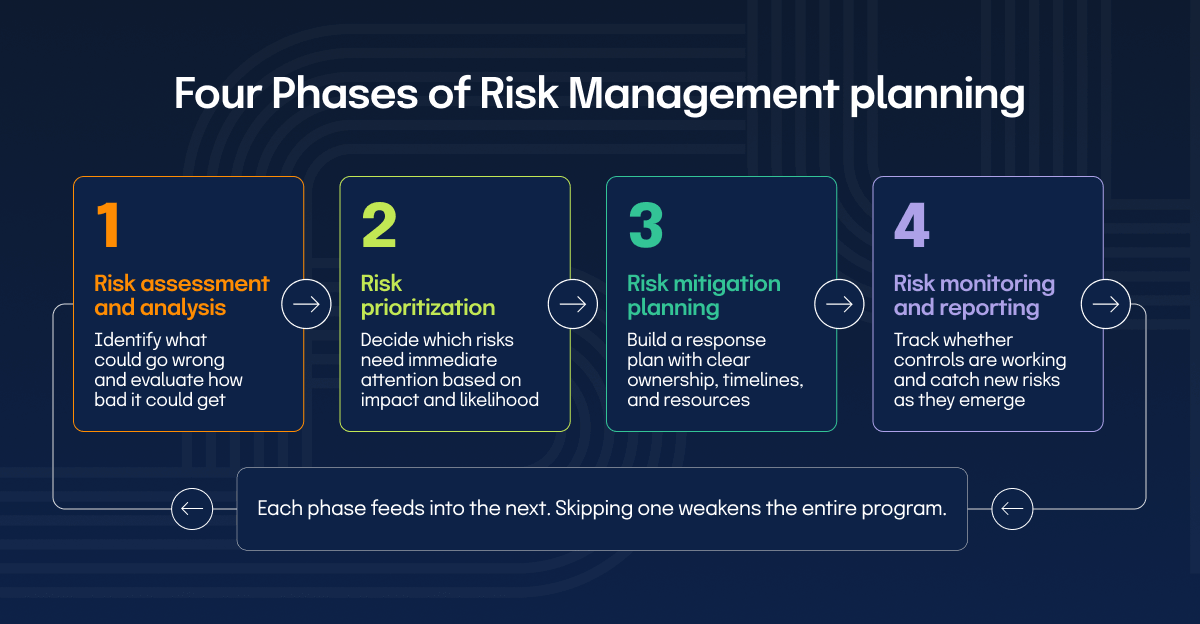
Risk management planning is how organizations identify potential risks and decide how to respond before those risks cause real damage. It spans four phases: assessing and analyzing risks, prioritizing them based on impact and likelihood, building mitigation strategies, and continuously monitoring your risk environment (more on this in a minute).
Each phase builds on the previous one, creating a structured approach that helps organizations stay ahead of risks rather than scrambling to respond after something goes wrong.
Together, these phases form the operational foundation of a functioning risk management program.
What has technology changed in risk management?
The risk environment organizations operate in today looks nothing like it did ten years ago. Threats move faster and the cost of a missed risk is higher than ever. The question is no longer whether technology has a role in risk management. It is understanding exactly what has changed and what that means for how your program should operate. The biggest shifts include:
The data backs this up. According to Hyperproof’s 2026 IT Risk and Compliance Benchmark Report, nearly all GRC professionals (97%) surveyed are now using AI to streamline their workflows.
Let’s walk through each phase of the risk management process to see exactly where technology moves the needle, and where it still doesn’t.
How can technology change each phase of risk management?
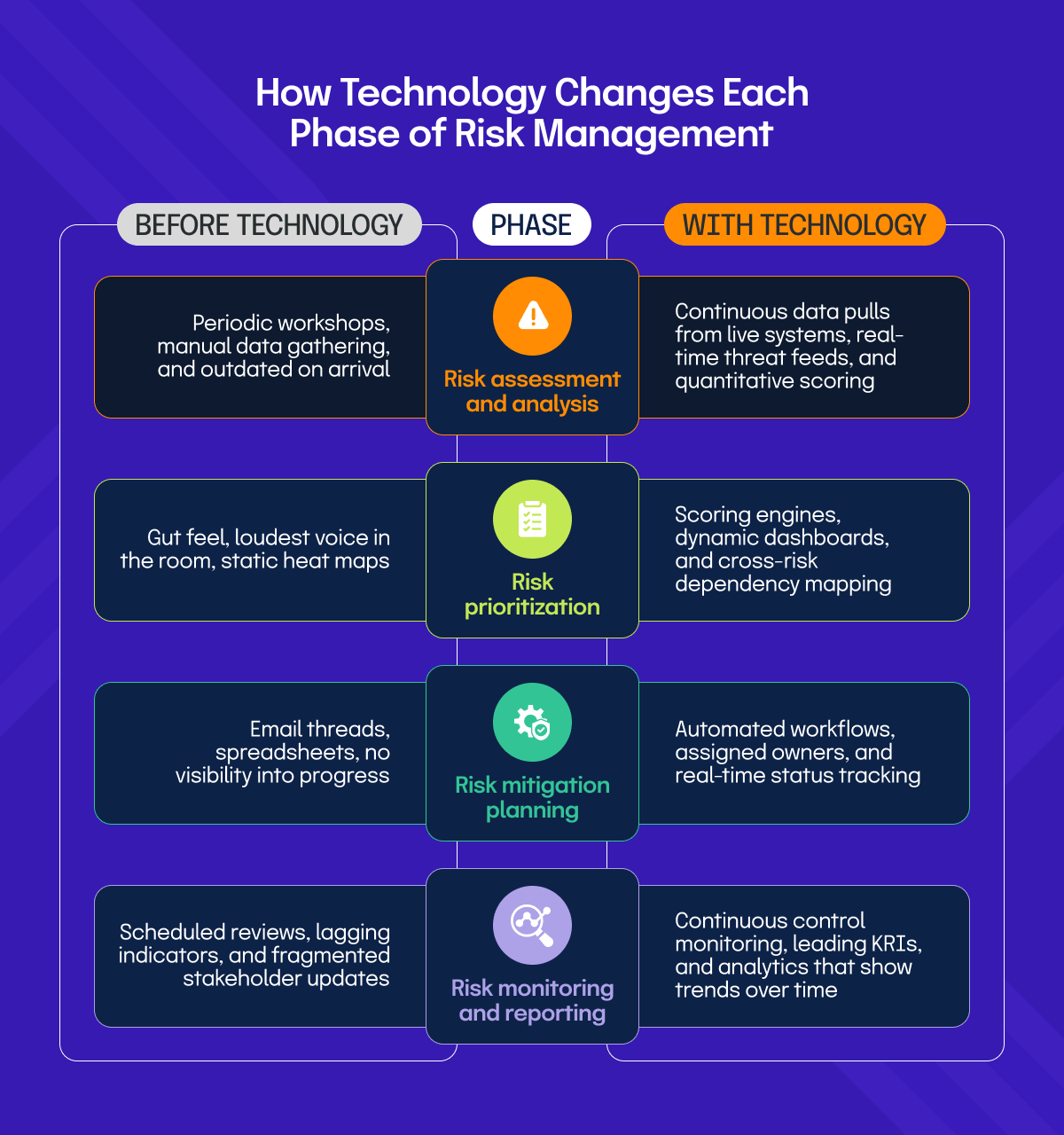
Technology does not change what the four phases of risk management are. It changes how well, how fast, and how consistently you can execute them. Let’s walk through each phase, what technology makes possible at each step, and the key things to consider as you apply it.
Risk assessment and analysis
At its most basic level, risk assessment is about answering two questions: what could go wrong, and how bad could it get? Traditionally, this meant periodic workshops, manual data gathering, and assessments that were outdated before the ink dried. Technology changes the inputs, the speed, and the consistency of this process entirely.
Modern GRC platforms pull data directly from your systems, vulnerability scanners, and threat feeds to build assessments grounded in what is actually happening right now, not what someone estimated last quarter. As organizations mature, they move beyond basic scoring toward quantitative analysis, integrated dashboards, and cross-functional data that builds a complete picture of risk exposure across the business.
Things to consider:
Risk prioritization
Identifying risks is the easy part. Deciding which ones actually get attention and resources is where most organizations struggle. Without a structured approach, prioritization defaults to whoever raises the loudest concern or whatever surfaced in the last incident.
Technology brings objectivity and consistency to this process. Scoring engines and risk dashboards surface the priority stack clearly and make the rationale visible and defensible to leadership. More mature organizations go further, using tools that factor in velocity, trend lines, and cross-risk dependencies, moving beyond a simple likelihood versus impact grid toward something more dynamic and forward-looking.
Things to consider:
Risk mitigation planning
Once risks are prioritized, you need a plan for what to do about them. This is where risk management stops being analytical and starts requiring commitment, ownership, and budget. It is also where many organizations stall.
Technology does not write the mitigation plan for you, but it makes execution significantly more manageable. Workflow automation assigns tasks, tracks progress, sends escalations, and gives leadership real-time visibility into where mitigation actions stand across the organization. What previously lived across email threads and spreadsheets becomes a single, auditable, trackable system.
Things to consider:
Risk monitoring and reporting
Risk monitoring and reporting are how organizations stay on top of their risk environment after mitigation plans are in place. It involves tracking whether controls are working, catching new risks as they emerge, and keeping stakeholders informed. Without it, even the best mitigation plan becomes a document that slowly drifts out of sync with reality.
Technology has made this phase significantly more manageable. Automated monitoring tracks control performance continuously without waiting for a scheduled review. Reporting gives stakeholders a real-time view of where things stand, while analytics builds the longer-term picture, spotting patterns across control performance data that help leadership evaluate whether the overall risk program is actually working, not just whether today’s numbers look acceptable.
As part of their automation effort with Hyperproof, Brenda Bernal, VP of Product Security and Compliance at DigiCert, shared: “We saved roughly over 1,100 personnel hours.” That is time redirected from administrative tracking into actual risk work.
Things to consider:
What can’t technology fix in risk management?
Technology improves how risk management gets executed, but it does not fix the conditions that make risk management work in the first place. A GRC platform:
Technology is a force multiplier, but only for what is already working
How should you implement technology in risk management planning based on your maturity level?
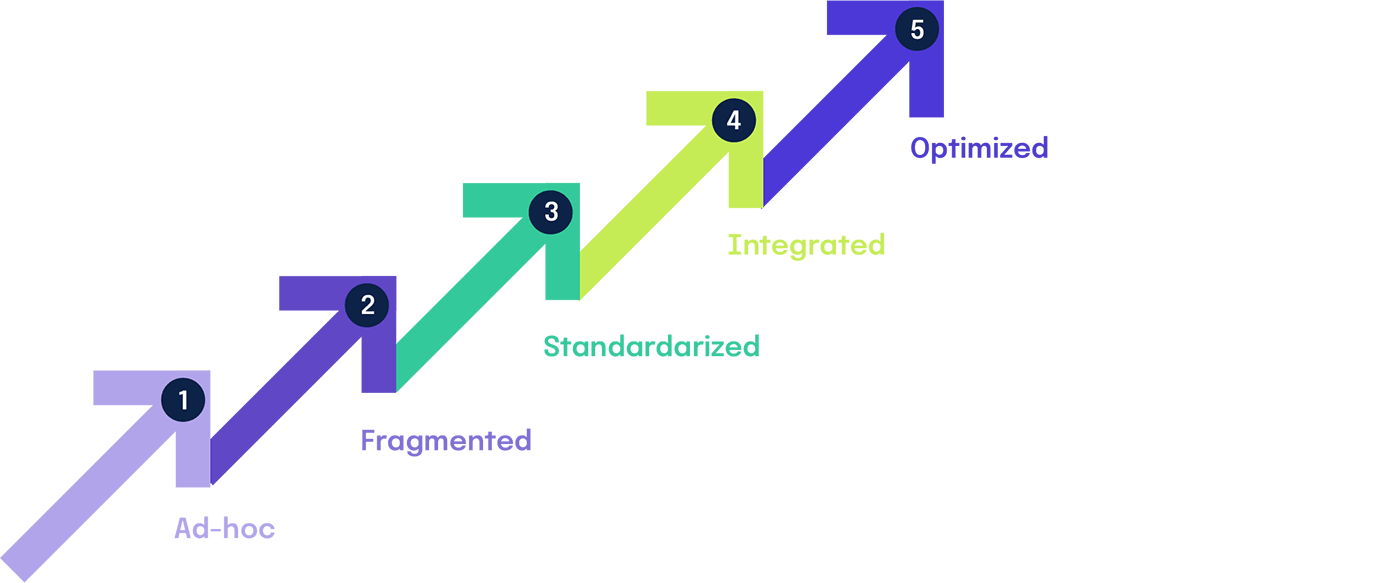
Where you start with technology depends entirely on where your program currently stands. The Hyperproof GRC Maturity Model defines four levels, and the right technology investment looks very different at each one.
Traditional
At this stage, the priority is not tooling, it is process. Document your risk assessment methodology, assign ownership, and establish a basic risk register. Introducing a sophisticated platform before this groundwork exists is one of the most reliable ways to waste budget.
Initial
This is where purpose-built GRC tools start to earn their place. Automate evidence collection, centralize your risk register, and establish basic reporting cadences. The goal here is consistency and visibility across the organization, not sophistication.
Advanced
Integration becomes the priority. Connect risk data across functions, introduce continuous control monitoring, and start using analytics to evaluate program effectiveness over time. This is also the stage where automation starts delivering measurable returns on time and resources.
Optimal
At this level, the focus shifts to continuous improvement and predictive capability. Advanced analytics, AI-assisted risk identification, and real-time monitoring allow the program to get ahead of risks rather than respond to them.
The right technology at the right maturity level accelerates progress. Skipping stages rarely works and almost always creates more complexity than it resolves.
Wondering what your GRC Maturity Level is? Our GRC Maturity assessment, designed by industry experts, shows you where your GRC program stands today.
How does Hyperproof help you manage risk across every phase?
Hyperproof is built around the reality that risk management is not a single activity but a continuous process across every phase. It brings together risk intake, assessment, prioritization, mitigation tracking, and monitoring into one connected platform, so teams are not stitching together spreadsheets and disconnected tools to understand where things stand. What makes the difference in practice is the visibility it creates across the entire risk lifecycle.
Risks are collected through customizable intake surveys, scored against your organization’s own tolerance and impact scales, mapped directly to controls, and tracked through exportable dashboards that show how your risk posture changes over time. Evidence collection is automated through 200-plus integrations, which means the hours previously spent on manual gathering get redirected toward actual risk work.
Want to see how it works for your team? Get a demo and see Hyperproof in action.
Related Resources
Ready to see Hyperproof in action?